Half Sphere
The top hemisphere of a sphere -- a dome shape. Useful for creating domed tops, lens shapes, and rounded covers.
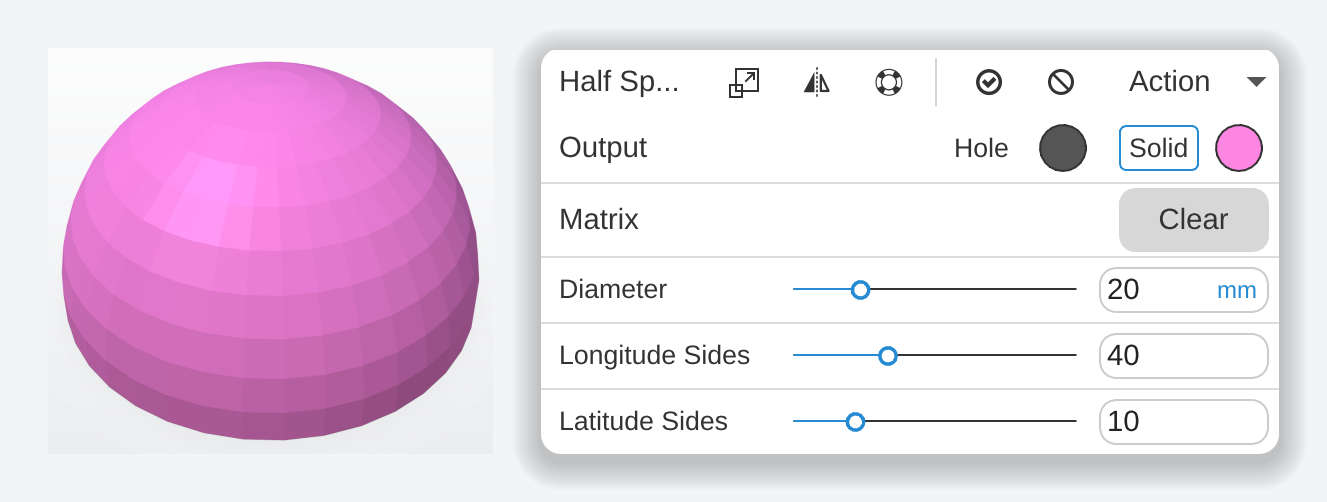
Parameters
- Diameter - The width across the base of the dome (default: 20mm)
- Longitude Sides - Number of segments around the perimeter (default: 40)
- Latitude Sides - Number of segments from base to top (default: 10). More = smoother dome
- Grow From - Which side of the part stays where it is when you change its size: Center (the default) grows it the same amount on every side, Front Left keeps its front and left sides in place so it grows toward the back and right, and Back Right keeps its back and right sides in place so it grows toward the front and left. The sides are the part's own, so a part you have turned grows along its own sides. The bottom always stays where it is. It applies when Diameter changes, whether you type it or a formula changes it; other settings don't use it. It is the last row in the panel
Tips
- Combine two half spheres with a cylinder for a capsule shape
- Place on top of a cylinder to create a domed lid or button
- Use with Subtract to create dome-shaped cavities
Related
- Sphere - A full ball shape
- Half Cylinder - A cylinder cut in half